Writing · MCP infrastructure
Putting my own MCP server behind my own MCP gateway
How I run Agent Toolbelt behind Cordon. Audit logs and approval gates for the expensive calls.
I built Agent Toolbelt last year. It's an MCP server with 27 tools my agents call when they need stock research, schema generation, regex help, or any of the other small things that came up in my workflow.
A few months ago I built Cordon. It's an MCP gateway that sits between an agent and any upstream MCP server, logs every tool call, and lets you write policies that block or gate calls before they fire.
This post is what happens when I run one in front of the other.
The gap
Agent Toolbelt has tools that cost money to call. stock_thesis is five cents per invocation. count_tokens is a hundredth of a cent. The cheap ones are fine to let an agent loop on. The expensive ones are not.
When I'm prototyping, this doesn't matter. I run the agent, I see the output, if it does something weird I notice and stop it. Production is a different story. The agent runs on a schedule. Nobody is watching when it hits stock_thesis 50 times in a minute because it got stuck in a planning loop.
Cordon fixes that for me. Every tool call shows up in an audit log, calls I've tagged as expensive get blocked or paused for my approval and the agent can't ruin my month.
The setup
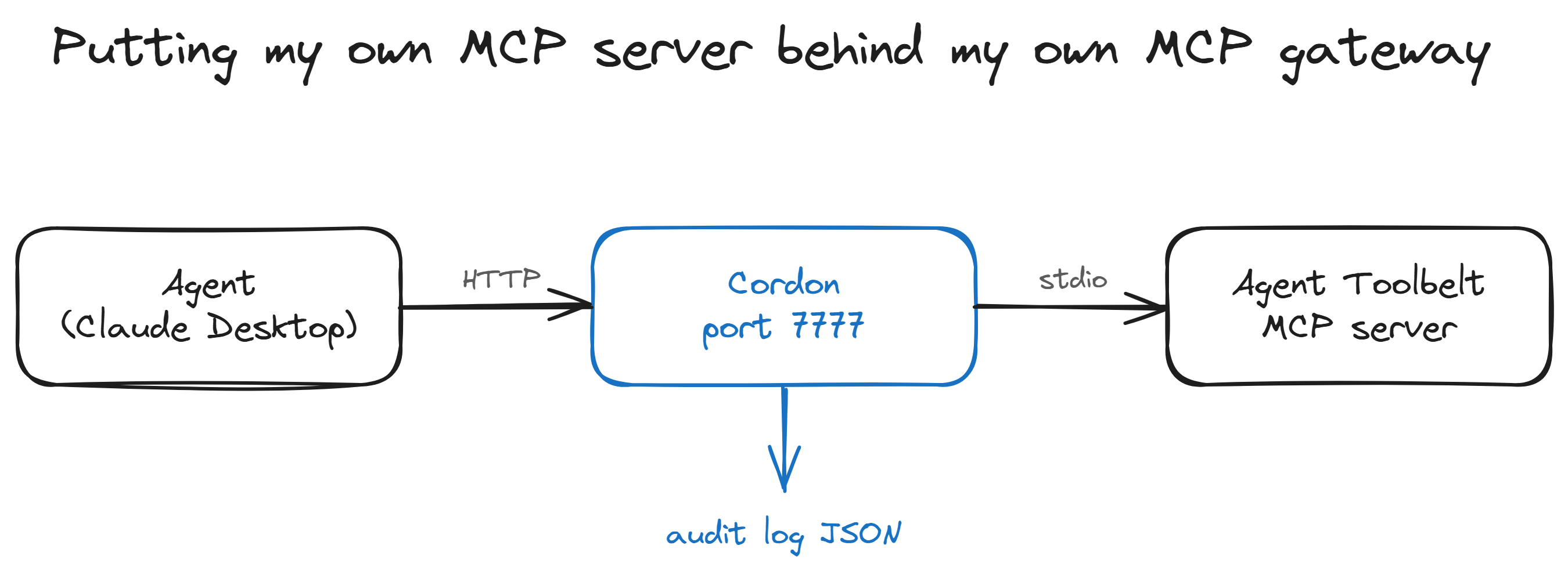
┌─────────────────┐     ┌──────────────────────┐     ┌──────────────────────┐
│ Claude Desktop  │ ──→ │ Cordon (port 7777)   │ ──→ │ Agent Toolbelt MCP   │
│   (or Cursor)   │     │  • audit log         │     │   server (stdio)     │
└─────────────────┘     │  • policy engine     │     │  • 27 tools          │
                        │  • Bearer auth       │     └──────────────────────┘
                        └──────────┬───────────┘
                                   │
                                   ▼
                          audit JSON to stdout
                          or to the dashboard
Claude Desktop talks to Cordon over HTTP. Cordon talks to Agent Toolbelt over stdio (the way MCP servers are normally launched). From Claude's perspective nothing about the tool surface has changed. The only difference is that every call now has a record.
Step 1. Get an Agent Toolbelt API key
Agent Toolbelt's MCP server ships on npm as agent-toolbelt-mcp. We don't need to install it directly. Cordon will spawn it as a child process via npx in the next step. The one thing you do need is a free API key.
curl -X POST 'https://www.agenttoolbelt.live/api/clients/register' \
  -H 'Content-Type: application/json' \
  -d '{"email":"you@example.com"}'
Save the atb_... key it returns. Free tier covers a thousand calls a month, no card.
Step 2. Put Cordon in front of it
Cordon ships as @getcordon/cli on npm.
npm install -g @getcordon/cliWrite a cordon.config.ts that points at Agent Toolbelt as a stdio upstream. Cordon will run npx -y agent-toolbelt-mcp under the hood and pipe stdio to it.
import { defineConfig } from '@getcordon/policy';

export default defineConfig({
  servers: [
    {
      name: 'agent-toolbelt',
      transport: 'stdio',
      command: 'npx',
      args: ['-y', 'agent-toolbelt-mcp'],
      env: {
        AGENT_TOOLBELT_KEY: process.env.AGENT_TOOLBELT_KEY,
        AGENT_TOOLBELT_URL: 'https://www.agenttoolbelt.live',
      },
      policy: 'allow',
    },
  ],
  gateway: {
    transport: 'http',
    port: 7777,
    authToken: process.env.CORDON_GATEWAY_TOKEN,
  },
  audit: { enabled: true, output: 'stdout' },
});
Start it.
export AGENT_TOOLBELT_KEY=atb_your_key_here
export CORDON_GATEWAY_TOKEN=$(openssl rand -hex 16)
cordon start --http
Cordon spawns Agent Toolbelt as a child process. The gateway starts listening on http://127.0.0.1:7777/mcp. The stderr line you're waiting for looks like this.
[cordon] HTTP gateway listening on http://127.0.0.1:7777/mcpStep 3. Point Claude Desktop at Cordon
Open claude_desktop_config.json (or your editor's MCP config equivalent). On Windows it's at %APPDATA%\Claude\claude_desktop_config.json. On macOS it's at ~/Library/Application Support/Claude/claude_desktop_config.json.
Replace the Agent Toolbelt entry with a Cordon entry.
{
  "mcpServers": {
    "agent-toolbelt-via-cordon": {
      "url": "http://127.0.0.1:7777/mcp",
      "headers": {
        "Authorization": "Bearer <your CORDON_GATEWAY_TOKEN>"
      }
    }
  }
}
Restart Claude Desktop. The hammer icon shows the same 27 tools as before. Nothing in Claude's view has changed.
Step 4. Run something and watch the log
Ask Claude something that fires a tool call.
"List all the tools available in the Agent Toolbelt."
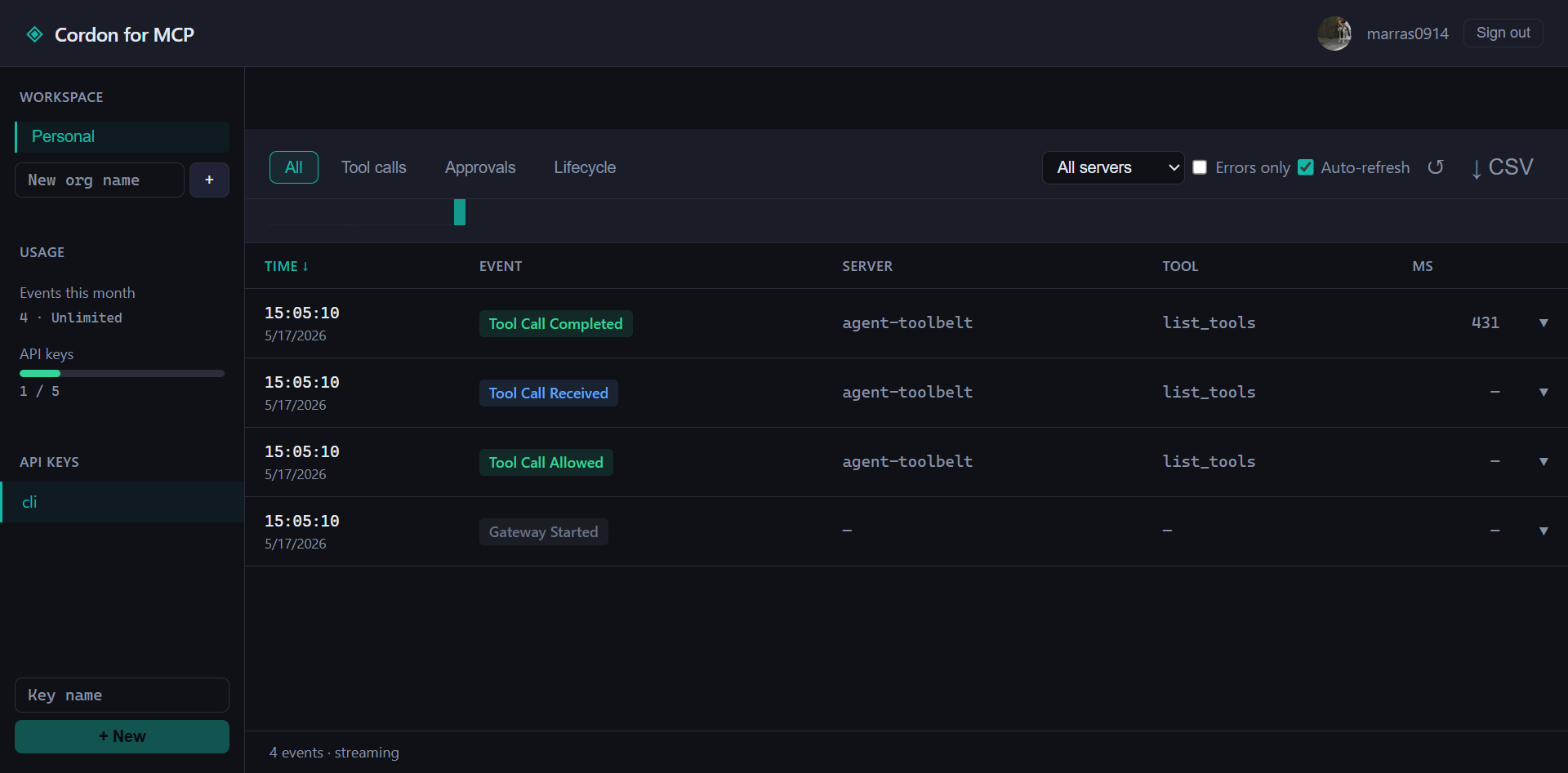
Claude calls list_tools. Cordon proxies it through. The audit log writes JSON to stderr.
{"event":"tool_call_received","timestamp":1747366621337,"callId":"call_001","serverName":"agent-toolbelt","toolName":"list_tools","args":{}}
{"event":"tool_call_completed","timestamp":1747366621703,"callId":"call_001","toolName":"list_tools","durationMs":366}
Two lines, one when the call entered Cordon, one when it came back. The durationMs is round-trip latency through the upstream MCP server. That's it.
If you flip audit.output to 'hosted' with a Cordon API key, those same events land in the dashboard at app.getcordon.com and the call shows up as a row in a table. Same data, friendlier surface.
Step 5. Gate the expensive calls
Right now my policy is 'allow' for everything. Fine for setup, not useful for the actual reason I'm doing this.
Here's the version I run.
servers: [
  {
    name: 'agent-toolbelt',
    transport: 'stdio',
    command: 'npx',
    args: ['-y', 'agent-toolbelt-mcp'],
    env: { /* same as before */ },
    policy: 'allow',
    tools: {
      stock_thesis:   { action: 'approve', reason: 'Costs $0.05 per call' },
      moat_analysis:  { action: 'approve', reason: 'Costs $0.05 per call' },
      bear_vs_bull:   { action: 'approve', reason: 'Costs $0.05 per call' },
      compare_stocks: { action: 'approve', reason: 'Costs $0.05 per call' },
    },
  },
],
approvals: { channel: 'terminal', timeoutMs: 60_000 },
Now when the agent tries to call stock_thesis, Cordon pauses and asks me before the call fires. In the terminal it shows up as an [A]/[D] prompt with the tool name, arguments, and the reason I wrote. Approve and the call goes through. Reject and the agent gets back a clean error it can recover from.
If you've wired up Slack approvals, the prompt comes as a DM with the same context. Useful when the agent is running headless on a server and you're not at the terminal.
The cheap tools keep flowing through. count_tokens doesn't need approval. text-extractor doesn't either. Only the four tools at five cents a call wait for my green light. That's the trade I want.
Why I built both
I built Agent Toolbelt because I wanted my agents to have tools without writing every one from scratch. Stock research, schema gen, regex, color palettes and the lot.
I built Cordon because I didn't trust what my agents were doing with those tools.
The two products solve different problems. Agent Toolbelt is the capability. Cordon is the oversight on top of it. Running them stacked is the setup I use on my own machine, and it's the one I'd recommend to anyone shipping agents past the prototype stage.
Both are free at this scale and Agent Toolbelt has a thousand call free tier. Cordon has no paid tier exposed today, so if you've already got Agent Toolbelt wired up, adding Cordon is a ten-minute config change.
Try it
- Agent Toolbelt on npm: npmjs.com/package/agent-toolbelt
- Cordon: getcordon.com
- End-to-end verification scripts: github.com/marras0914/cordon/tree/main/examples/agent-toolbelt-e2e. Three Node scripts that prove the chain works. Clone the repo,
cd examples/agent-toolbelt-e2e && npm install && ./run-all.ps1. Useful if anything in the post stops matching reality.